How I turned my iPhone into a modern feature phone
Recently, I’ve been thinking a lot about how I use my everyday tech.
Sometimes this has involved making more use of simple but forgotten features – for example, I’ve started asking Siri to set a timer on my Apple Watch when cooking rather than reaching for my iPhone, and a while back I wrote about how I traded the X algorithm for curated lists. More often than not, these changes have centred on a desire to drop unwanted habits.
The biggest of these is timewasting. My daily iPhone use is higher than I’d like, and at the top of the list are social media apps that deliver little real value. But it’s hard to consciously limit their use, because rather than one mammoth session, it’s small checks throughout the day that add up.
Screen Time is the most discussed feature for limiting access to apps, but you still see the icons when you scroll through the menu, and as long as you have the option to unlock them, it’s tempting to override the restrictions. After bypassing a small extra hurdle, suddenly you’re back to scrolling Instagram.
Luckily, Apple gives you tools to take better control – it just doesn’t shout very loudly about them. In this post, I’ll explain a new interface I built to take the decision out of my hands and avoid reflexively opening social apps.
Environment over willpower
As a prerequisite, I’d recommend turning off nearly all the notifications on your phone in Settings. The only apps I allow to trigger notifications are the phone itself, messaging apps, email, and my bank – and most of those run silently, without a sound or vibration. No social update or breaking news alert is important enough to distract my attention or interrupt my day.
With that change made, hopefully you’re no longer being actively prompted to open timewasting apps, but you might find you still revert to them without thinking when you’re bored and flicking through your phone.
As James Clear wrote in Atomic Habits, environmental design often matters more than discipline when trying to stop a bad habit. Simply seeing those colourful little icons is a trigger. The solution is to hide them from view entirely, so you forget they exist unless you actively seek them out.
Environmental design often matters more than discipline when trying to stop a bad habit – just seeing those colourful little icons is a trigger.
You could uninstall them altogether, but the problem is that these apps all have their legitimate uses: Facebook lets you see what your parents are up to. X is the fastest place for breaking news in your industry. Instagram is where that one awkward friend insists on sending messages. These actions are only a fraction of your time in each app, but they mean you still need them.
Another simple option is to move the apps to a folder, hidden away on the second or third menu screen. This sounds good in principle, but in practice you’ll quickly develop the muscle memory to find and open the folder almost as quickly as you tapped the app icons in the first place. It doesn’t work.
iPhone’s hidden superpower
It’s far more effective to avoid the Home Screen altogether. Luckily, Apple has given us a criminally underpromoted feature to do just that.
Shortcuts is one of my favourite apps, but it barely gets a mention in any of Apple’s promotional material. It’s a way to build automated workflows on your iPhone, but it’s also flexible enough that it effectively allows you to build parts of the iPhone user interface that you wish Apple did.
A multipurpose tool
While I’ll discuss building a small menu, there is way more you can do with Shortcuts, and if you’re even mildly technical I’d recommend taking the time to play with it. Its modules make it possible to grab online content, send messages, and even run scripts over SSH. Practical uses extend from automatically setting your morning alarms the night before, all the way to full-on AI workflows that push data to and from Claude and ChatGPT.
To avoid social media apps altogether, I used Shortcuts to build my own menu that I can open from anywhere on my phone, which only includes useful productivity apps and those that I get at least some value from.
It’s simple to do: Use the Choose from Menu action to give yourself options, then under each option’s section add the action to perform if it’s chosen.
For simple items, this would be Open App. But if you wish, you can also get a lot more intricate. For example, my “AI models” item is a sub-menu, using a nested Choose from Menu action to allow me to select a model.
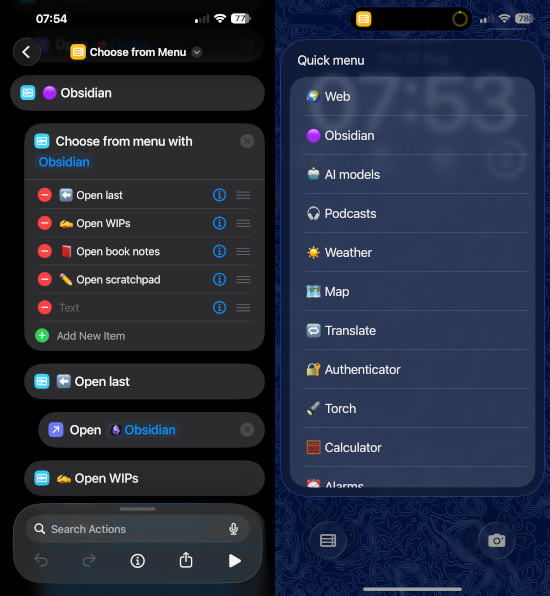
I did much the same thing for Obsidian, but rather than using Open App, I used Open URL and Obsidian’s own actions to jump straight to specific notes and bookmarks. So not only am I avoiding the temptation of my social apps, but I’m saving time thumbing through menus in Obsidian, too.
The key to developing the habit of opening the new menu is to make it easily accessible from the Lock Screen. I replaced the torch icon in the bottom left corner with a menu link, and – better yet – programmed my iPhone’s Action Button (the little one above the volume buttons on newer models) to run my shortcut and open the menu, so it’s easy to reach from anywhere.
A modern feature phone
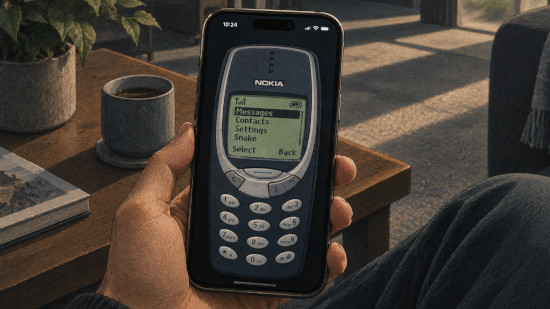
My custom menu has essentially transitioned my iPhone to a feature phone interface. Most of my use is now via a simple text menu, so I don’t even see the distracting apps. And thanks to the Action Button and the timesaving options I added, it didn’t take long to build the habit of using it.
Yes, I can still swipe up into the Home Screen to get on social media apps – and sometimes, when I have the time to spare, I do. But my new setup has added another barrier to opening them, and since I mostly use my custom menu, even seeing those icons registers as a red flag that I’ve taken a wrong turn and am about to waste time. It’s easier to step in and stop myself.
The custom menu has added another barrier to opening social apps – it's easier to step in and stop myself if I reach the Home Screen.
The menu also removes some of the flashiness from my phone. It’s plain. It’s not animated. I’ve used emojis to help myself recognise each option, but you could also keep it to plain text if you wanted. It’s like the menu equivalent of switching to monochrome, naturally making my phone less alluring.
So if you’re tapping into social apps without thinking, consider building a simple custom menu with Shortcuts. It’s like finding the perfect balance between the functionality of an iPhone and the simplicity of a Nokia 3310, and it might be just what you need when willpower alone won’t do.
Now hitting the Action Button has become its own habit. I open my phone with intentionality, knowing what I want before I unlock it. Then I check the weather, take a note, or plan a route without even seeing the social app icons. And when I’m finished, it goes straight back in my pocket.